Wednesday, March 2, 2011

Why we choose GWT

LogicalDOC moved from a traditional user interface based on scripting technology like JSP/JSF to the modern and powerful GWT framework coming from Google. Up to now, we are proud to offer the Document Management System with the more advanced user interface available today.
This new approach allowed us to drastically reduce the code for the presentation layer and limit the knowledge needed to develop, since we dropped a lot of complex enterprise technologies to start to develop in pure Java language.
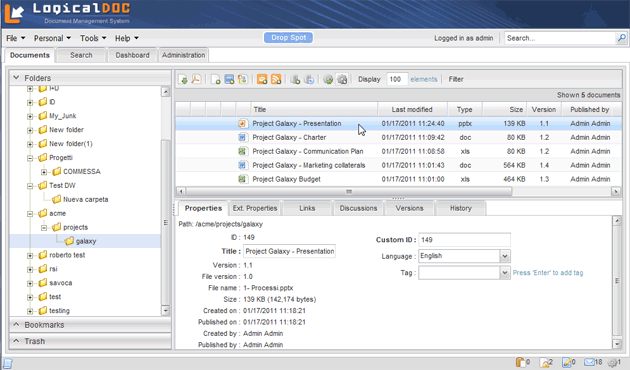
LogicalDOC 6.0 GWT GUI (click to enlarge)

When the experience counts

It doesn't matter how good is your product, the only thing your users will look is the user interface. After all each electronic artifact exists to serve human people business processes. So the way in which your users interact with your system is the most important aspect and you have to take care about your users experience.
A graphical user interface based on GWT (Google Web Toolkit) technologies will assure you these following goals:
  • High response times, since all the GUI is executed in the client side
  • High experience, equal to a traditional desktop systems
  • Compatibility with all used browsers
The best thing that GWT will do for you is to completely decouple the presentation layer (completely executed in the client) from the business and data layers (completely executed in the server)

GWT role in an Enterprise Application

Approaching the development of an enterprise-class application like LogicalDOC, involves the development of a large number of similar widget and forms for data manipulation. These elements are presentation layer components, and here are two general approaches to develop them:
  1. Creating of separate classes which represents visual component for each form.
  2. Creating universal visual components and widgets that can be composed together
If you try to follow the first way you probably will have a lot of code to produce and a lot of development time. You may agree that the correct approach is the first one and GWT simply adopts the Object Oriented paradigm allowing you to reuse components and take benefit from concept like inheritance and polymorphism.
So when building a user interface with GWT, it is possible to use generic components, significantly reducing the resources for the development of the presentation layer. In addition since GWT is pure Java you will not be required to use senior development resources, you just develop in standard Java.
Bookmark and Share

Friday, February 11, 2011

Search LogicalDOC from your Smartphone

Logical Objects is pleased to announce that from Friday 02/11/2011 is available on Google Marketplace the LogicalDOC App in version 1.0.

This application allows you to connect to a remote LogicalDOC 6.0 and via Web-services perform full-text search on the repository of documents, to view the results of a search (including snippets of text) and to download the document on your smart-phone or Android tablet.

The application works with both LogicalDOC CE (Community Edition) and the Commercial editions of software.

Find the LogicalDOC Android App in the Android Marketplace searching for 'logicaldoc'

LogicalDOC Android icon

Configuring connection parameters to a LogicalDOC server instance

Composing Full-text search

Full-text search results

Display content snippet of a search result

Download of a document can be activated by doing a long-time press on a result of a full-text search

Find the LogicalDOC Android App in the Android Marketplace searching for 'logicaldoc'
Bookmark and Share

Wednesday, March 3, 2010

LogicalDOC Store Live

Logical Objects presents the new LogicalDOC Store. This is the official e-commerce site where you can purchase all LogicalDOC products.

We have created this online store to allow you to buy in simplicity and security all products related to LogicalDOC from software licenses to support services.

To all of you, from all of us at LogicalDOC Store - Thank you and Happy Shopping!

http://store.logicaldoc.com


The LogicalDOC Team

Bookmark and Share

Monday, January 18, 2010

2 lines about the New Graphic

For the 5.0 release of LogicalDOC we thought it was appropriate to do a restyling of the Web interface.
In particular we wish to give to the program a more modern design to communicate an image more professional and the strength of the solution.

Following this path we have taken action to change the head of the program by entering a dark-blue color to separate from the more operational section below, by including however, a varied background pattern to communicate a sense of modernity and speed.

As regards the menus we have redefined the head menus by removing the icons to give more uniformity to the whole and in consequence of this choice also contextual menus on documents have undergone the same treatment.

In a article appeared on a Polish blog our system was at fault in relation to others regarding the ergonomics of use.
To improve this aspect we have taken action on three fronts:
introduction of the navigation tree on folders, repositioning of the breadcrumb, restyling of the buttons.

Thanks to the navigation tree is much faster to move between folders, the repositioning of the breadcrumb in turn facilitates the user to understand its exact location within the repository, while the new style of the buttons enhances their visibility and usability.

We are very satisfied of the result obtained because our customers have appreciated this renovation and they informed us spontaneously that the new interface was more pleasant and functional than the last.

In the future we already have other innovations to further improve the GUI of LogicalDOC, one of which will be the contextual menu on folders.
This improvement will allow even easier access to functions on the folder, similar to the contextual menu on the documents.


Bookmark and Share

Thursday, January 7, 2010

LogicalDOC 5.0 Released

Logical Objects is pleased to announce the new release 5.0 of the popular LogicalDOC DMS. This new release represents a milestone in the product evolution.

LogicalDOC 5.0 comes with a complete and powerful Workflow, with this feature you can visually design your processes directly inside the browser without external editors. This workflow comprises an escalation management that allows you to define tasks lenghts and recurring warning messages to involved users.

Another important update regards the auditing, now users can register themselves to be notified about changes of single documents or entire folders, and this via e-mail or RSS.

Read more in the product website: http://www.logicaldoc.com

The LogicalDOC development Team

Bookmark and Share

Friday, January 1, 2010

LogicalDOC changed the reference Database

With the recently released version 5.0, LogicalDOC adopts MySQL as reference database.
The decision was taken in compliance with a lot of performance tests and MySQL was the right solution to obtain good speed performances on huge amounts of documents.
Bookmark and Share

Wednesday, September 2, 2009

What's new in LogicalDOC 4.5.2

Among the already mentioned improvements in the parsers of which we have previously given notice, in the new release there is an interesting update.

This is a new importer for ZIP compressed archives.

This importer, which is the class InMemoryZipImport, as its name suggest, is able to perform the import in memory of the documents in a compressed .zip archive.

This new importer replaces the previous one and is able to specify the encoding used for the names of directories and files in the archive.
This allows LogicalDOC to read correctly, with the right encoding, also archives created in format different than Unicode.

Also allows to overtake some limitations related to the extraction on the file system of those archives that contain characters not supported by the Operating System on which LogicalDOC is installed.

Another update that i find relevant is the one made on the translations.

In fact, thanks to the work of Sebastian Wenzky (krypthonas.de) and Jesús Marín (A.P.L. software) we have updated the translations of the software for German and Spanish.

The new version of LogicalDOC Community Edition, LogicalDOC CE 4.5.2 is available as usual on the project site at SourceForge at the following web address:
http://sourceforge.net/projects/logicaldoc/files/distribution/LogicalDOC%20CE%204.5.2/logicaldoc-4.5.2-tomcat-bundle.zip/download
Bookmark and Share